 Microsoft 365
M365 is the most common cloud based business identity platform (be that native or hybrid mode) and so defending this is a key element to business digital security (it’s clearly not the only thing though…. security is a very broad domain!), so I thought I would take a look at incident commonality and controls.
So I’ve used Claude with OPUS 5 to create some artifacts to help us explore this topic, but I’ll also show some of my experiences (with real world orgs and real world incidents)
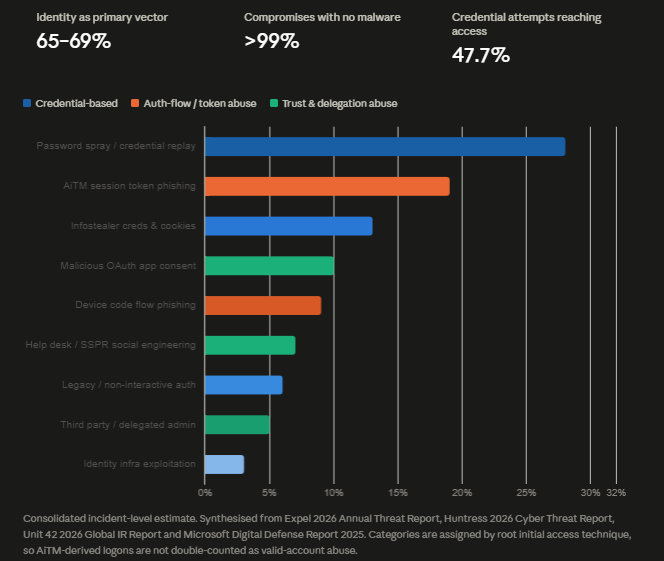
Microsoft Digital Defense Report 2025
Palo Alto Global Incident Report 2026
Vectors and Controls
| Vector | Controls that would have prevented it | Efficacy |
|---|---|---|
| Password spray / credential replay | Any MFA; smart lockout; banned password lists; CA policy blocking legacy auth; disable unused accounts (Midnight Blizzard’s entry was a dormant test account) | Near-total. This is the band MFA genuinely closes |
| AiTM session token phishing | Phishing-resistant MFA (FIDO2/passkeys, WHfB, CBA); CA token protection / sender-constrained tokens; compliant-device requirement; managed-browser enforcement | High, but only with phishing-resistant factors. Number-matching push does not stop this |
| Infostealer creds & cookies | Device compliance in CA (unmanaged host can’t replay the cookie); token protection; short sign-in frequency for high-risk apps; ASR rules + credential-store hardening on the endpoint | High when device binding is enforced; low if CA only checks identity |
| Malicious OAuth consent | Disable user consent, or restrict to verified publishers with low-risk permissions; admin consent workflow; Entra app governance policies; periodic consent-grant review | Total, and it’s a single tenant setting. Huntress saw OAuth abuse more than double year over year, from 4.8% to 10.1% |
| Device code flow phishing | CA policy blocking the device code grant except for a named exception group; block authentication transfer flow; restrict to compliant devices | Total. Most tenants have zero legitimate need for device code |
| Help desk / SSPR social engineering | Out-of-band identity proofing before any credential or MFA reset; video/manager verification for privileged users; TAP-only reset paths; restrict who can modify auth methods; alert on Update user/User registered security info for admins | High — but it’s a process control, not a product. Storm-2949 and Scattered Spider both walk in this way |
| Legacy / non-interactive auth | CA block on legacy clients; disable basic auth and SMTP AUTH per-mailbox; POP/IMAP/EWS off by default | Total, and it’s the highest-yield single policy in M365 |
| Third party / delegated admin | GDAP with least-privilege, time-bound roles; MFA enforcement on partner tenants; inventory and scope-limit SaaS integration tokens; conditional access for workload identities | Moderate — depends on partner posture, which is why supplier assurance matters here |
| Identity infra exploitation | Patch Entra Connect / ADFS aggressively; migrate off ADFS to cloud auth; PIM with approval for Global Admin; break-glass accounts excluded from CA but FIDO2-backed; monitor Set domain authentication | Moderate. CVE-2025-55241 generated no logs in the victim tenant, so detection was impossible — this class needs architectural reduction, not monitoring |
My Real World Experience
Phishing! Phishing and business email compromise are the most prevalent thing I’ve seen over the years, what I also see increasing now are: Attacker in the Middle (AITM) attacks and device code phishing! I also see (but it’s fairly rare) is some QR code phishing (which is designed primarily to move someone to mobile device to try and avoid some controls e.g. BYOD phone configs that don’t have defender etc.)
There’s some key things:
- ideally only allow managed devices (no BYOD)
- this is easy to say but in my experience much harder to ‘do’ in real world orgs. Humans, friction and perception of ‘cost’ etc. all play into business decision makers often wanting the easy path (for them), incidents sometimes change this, but not always!
- Disable/Restrict device code auth
- Conditional access policies to disable legacy authentication
- User phishing resistant auth (FIDO) passkeys or hardware tokens
- Have ‘good licensing’ which covers off the premium identity protection features, honestly, it’s worth the money given incidents are:
- Stressful
- Costly
- Impactful
- Time Consuming
Security requires considering the whole of the system, Identity is not the entire picture but its a large chunk of it! The news may be filled with AI vulnerability apocalypse but back at the tenant, your daily/weekly threats aren’t ‘the entity from mission impossible’ but probably phishing and malware on devices!
Blocking device code and legacy auth is generally really really simple, the risk of doing so is also generally low, and you can always have exceptions. Why leave 100% of the attack surface open when an Entra group and CA policy can take this down to 99% closed and 1% open (if that)!