Threat Intel
Imagine this, you setup a server and it has a really weak administrator password! Now let’s imagine you expose RDP to the internet. How long would it take to get pw3nd?
Well we did this, using a custom configuration to make this safe, we setup a Windows Server, setup an administrator account with the password of ‘password’ and monitored the logs! So let’s see what we found.
Honeypots Logs
| Day | Event ID | Description | Username | Type | Source IP | Workstation Name |
| 4 | 4624 | Logon (4624) | administrator | Network | 84.8.107.159 | – |
| 3 | 4624 | Logon (4624) | administrator | Network | 109.205.211.14 | – |
| 1 | 4624 | Logon (4624) | administrator | Network | 146.70.188.221 | localhost |
| 1 | 4624 | Logon (4624) | administrator | Network | 146.70.188.221 | localhost |
| 1 | 4624 | Logon (4624) | administrator | Network | 146.70.188.221 | localhost |
| 1 | 4624 | Logon (4624) | administrator | Network | 146.70.188.221 | localhost |
| 1 | 4624 | Logon (4624) | administrator | Network | 146.70.188.221 | localhost |
| 1 | 4624 | Logon (4624) | administrator | Network | 146.70.188.221 | localhost |
| 1 | 4624 | Logon (4624) | administrator | Network | 146.70.188.221 | localhost |
| 1 | 4624 | Logon (4624) | administrator | Network | 146.70.188.221 | localhost |
| 1 | 4624 | Logon (4624) | administrator | Network | 146.70.188.221 | localhost |
| 1 | 4624 | Logon (4624) | administrator | Network | 146.70.188.221 | localhost |
| 1 | 4624 | Logon (4624) | administrator | Network | 146.70.188.221 | – |
| 1 | 4624 | Logon (4624) | administrator | Network | 146.70.188.221 | – |
| 1 | 4624 | Logon (4624) | administrator | Network | 194.110.115.15 | – |
| 0 | 4624 | Logon (4624) | administrator | Network | 103.124.165.223 | SERVER |
| 0 | 4624 | Logon (4624) | administrator | Network | 103.124.165.223 | SERVER |
| 0 | 4624 | Logon (4624) | administrator | Network | 103.124.165.223 | SERVER |
| 0 | 4624 | Logon (4624) | administrator | Network | 103.124.165.223 | SERVER |
| 0 | 4624 | Logon (4624) | administrator | Network | 103.124.165.223 | – |
| 0 | 4624 | Logon (4624) | administrator | Network | 146.70.124.207 | agentworker[redacted] |
| 0 | 4624 | Logon (4624) | administrator | Network | 146.70.124.207 | agentworker[redacted] |
| 0 | 4624 | Logon (4624) | administrator | Network | 146.70.124.207 | agentworker[redacted] |
| 0 | 4624 | Logon (4624) | administrator | Network | 146.70.124.207 | agentworker[redacted] |
| 0 | 4624 | Logon (4624) | administrator | Network | 146.70.124.207 | – |
| 0 | 4624 | Logon (4624) | administrator | Network | 146.70.193.29 | agentworker[redacted] |
| 0 | 4624 | Logon (4624) | administrator | Network | 146.70.193.29 | agentworker[redacted] |
| 0 | 4624 | Logon (4624) | administrator | Network | 154.47.30.136 | agentworker[redacted] |
| 0 | 4624 | Logon (4624) | administrator | Network | 154.47.30.136 | agentworker[redacted] |
| 0 | 4624 | Logon (4624) | administrator | Network | 154.47.30.136 | – |
Enrichment
Using IPINFO we have enriched:
| IP | Location | ASN | Privacy Measures | Organization |
|---|---|---|---|---|
| 84.8.107.159 | Riyadh, SA | AS31898 | Hosting | Oracle Svenska AB |
| 109.205.211.14 | Warsaw, PL | AS201814 | Hosting | ColocationX |
| 146.70.188.221 | Sofia, BG | AS9009 | Hosting | M247 LTD Sofia Infrastructure |
| 194.110.115.15 | Zaventem, BE | AS9009 | Hosting | M247 LTD Brussels Infrastructure |
| 103.124.165.223 | Tirana, AL | AS197706 | Hosting | Keminet SHPK |
| 146.70.124.207 | Bucharest, RO | AS9009 | Hosting | M247 Europe S.R.L |
| 146.70.193.29 | Belgrade, RS | AS9009 | VPN, Hosting | M247 Ltd Belgrade |
| 154.47.30.136 | Johannesburg, ZA | AS212238 | VPN, Hosting | Datacamp Limited |
Analysis
People probably would expose this would get pwn3d every minute! That’s not actually what has occurred, the number of attempts (failed logins) are over 100K but actually the number of successful attempts are much much lower.
We can see here some useful metadata with machine names, we can clearly see IP addresses.
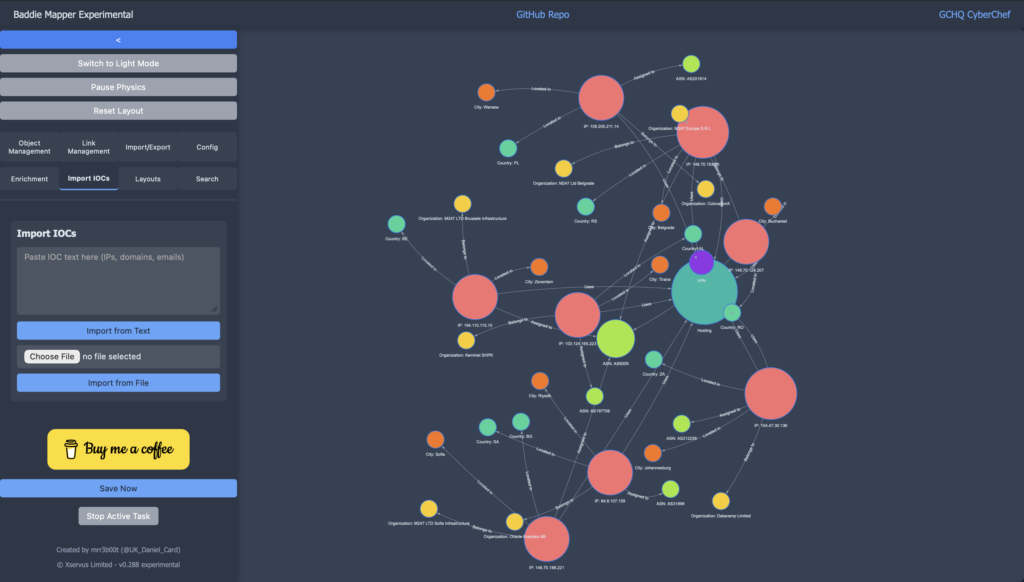
We have enriched the data with IPINFO using my vibe coded ‘Crime Mapper’ tool:
https://mr-r3b00t.github.io/crime-mapper/experimental_mapper.html
What does this tell us?
- Do not expose RDP with weak credentials! Great we already knew that!
- But it also tells us that probability is important to understand and that modelling these things isn’t that simple.
I’ve been building, deploying and operating honeypots for years so the results of this didn’t really surprise me, I’ve had times where I’ve struggled to believe pots are even ‘working’ because they have remained uncompressed for half a year or more.
The key thing here is: with risky configurations, you can go from zero to P1 in an instant. No one wants a ransomware event caused by generic usernames and password like: scanner!
Security is not binary, there’s lots of variables at play. With internet facing services there’s a bunch that can be done to give yourself much more of a fighting chance at success:
- Enable MFA where appropriate
- Passkeys are a really good UX
- Monitor Logs, Alert and Respond to important security events/activities
- Have sensible password policies (long is strong, and stop making people change them every 30 days)
- Password audits can be very useful to determine the current state posture/risk of credentials
- Monitor for compromise
- Use threat intel sources
- WAFs are really useful
- IPS and IDS are useful
- Host based firewalls rock!
- If you limit ingress you can really reduce the attack surface and likelihood of compromise
You can really put in a lot of defence in depth layers (like an onion) to your security posture, onions are far more robust than watermelons for security!